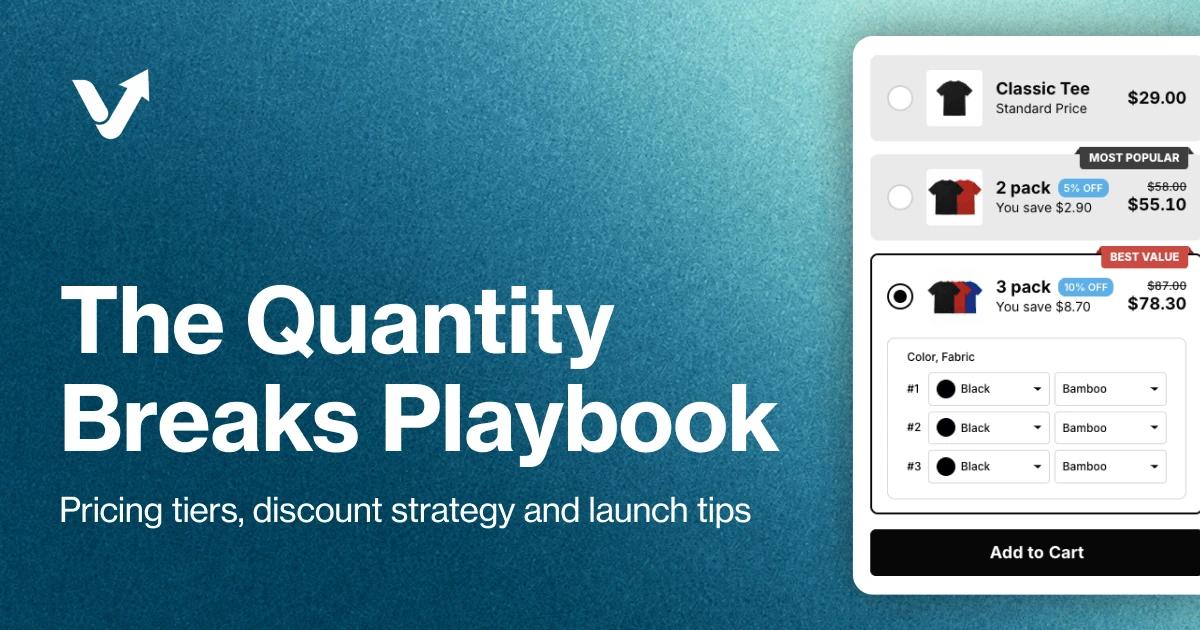
Quantity breaks are tiered discounts that reward customers for buying more units of the same product, shown as selectable pricing tiers right on the product page. They are the mechanism behind volume discounts, the broader bulk-pricing strategy of multi-packs, case pricing, and wholesale-style offers. In our experience, they are one of the most effective pricing strategies for increasing both average order value and total revenue, with consumable products responding hardest, often within the first month.
This guide walks through the whole build: tier math, profit-safe discount depth, product-page display, and a seven-day launch plan.
What Are Quantity Breaks?
Quantity breaks offer customers a discount when they buy multiple units of a product. The more they buy, the more they save per unit.
Example Structure:
- Buy 1: $29.99 each
- Buy 2: $27.99 each (7% off)
- Buy 3+: $24.99 each (17% off)
Why Quantity Breaks Work
1. Psychology of Savings
Customers love feeling like they're getting a deal. Even if they only planned to buy one unit, the potential savings on buying more creates a compelling reason to increase their order.
2. Reduced Decision Friction
Instead of "Should I buy this?" the question becomes "How many should I buy?" - shifting from whether to how much.
3. Bulk Buying Behavior
Many products are bought in multiples naturally:
- Gifts (holidays, weddings, birthdays)
- Consumables (refills, replacements)
- Matching items (sets, outfits)
- Wholesale purchases
When to Use Quantity Breaks
Quantity breaks work best for three kinds of catalogs:
Products with repeat purchases. Beauty products, supplements, food items, and office supplies run out and get rebought; a discount for stocking up matches how people already shop them.
Gift-friendly items. Jewelry, home decor, accessories, and apparel basics are often bought in multiples for different recipients, so the second unit is an easy sell.
Wholesale-suitable products. B2B inventory, bulk supplies, and reseller products, where buyers already expect a better per-unit price at volume.
Skip quantity breaks for big-ticket items (nobody buys a second sofa for a discount), one-time purchases, highly personalized products, and anything whose margin cannot absorb a per-unit discount.
Setting Up Your Tiers
Step 1: Calculate Your Break-Even Point
First, understand your margins:
Product Cost: $12
Selling Price: $30
Profit Margin: $18 (60%)
Step 2: Design Your Tiers
Create 3-4 tiers that progressively increase savings:
Conservative Approach:
- Tier 1 (1 unit): $30 - 0% off
- Tier 2 (2 units): $28.50 - 5% off
- Tier 3 (3+ units): $27 - 10% off
Aggressive Approach:
- Tier 1 (1 unit): $30 - 0% off
- Tier 2 (2-3 units): $27 - 10% off
- Tier 3 (4-5 units): $24 - 20% off
- Tier 4 (6+ units): $21 - 30% off
Three tiers also let you lean on the compromise effect, the well-documented tendency of shoppers to pick the middle option, with the top tier existing partly to make the middle look reasonable. It is not a guaranteed lever; Simonson's own later research found the pull toward the middle weakens for shoppers who arrive with heavy comparison research done, which is one more reason to A/B test your tier structure (see below).
Step 3: Set Strategic Thresholds
Your quantity thresholds should:
- Start at 2 units (easiest jump for customers)
- Have manageable increments (2, 3-5, 6-10)
- Align with common buying patterns
Displaying Quantity Breaks Effectively
Visual Best Practices
1. Price Table Format
┌──────────────┬─────────────┬───────────┐
│ Quantity     │ Unit Price  │ You Save  │
├──────────────┼─────────────┼───────────┤
│ 1            │ $30.00      │ -         │
│ 2-3          │ $27.00      │ $6-$9     │
│ 4+           │ $24.00      │ $24+      │
└──────────────┴─────────────┴───────────┘
2. Visual Slider
Show savings dynamically as customers adjust quantity
3. Badge Highlights
"BEST VALUE" or "MOST POPULAR" on your target tier
Copy That Converts
Vague copy like "Buy more, save more" or "Volume discount available" undersells the offer. Specific copy converts: "Buy 3, Save $18 (20% off)" or "Stock up and save up to 30%" tells the shopper exactly what they gain and makes the math feel done for them.
Advanced Strategies
1. Seasonal Quantity Breaks
Adjust tiers for peak seasons:
- More aggressive discounts
- Lower quantity thresholds
- Gift-focused messaging
Off-Season:
- Conservative discounts
- Higher thresholds
- Inventory-clearing focus
2. Customer Segmentation
Different tiers for different customers:
Retail Customers:
- Buy 1: $30
- Buy 2-3: $27
- Buy 4+: $24
Wholesale Customers:
- Buy 10-24: $20
- Buy 25-49: $18
- Buy 50+: $15
3. Product Bundling with Breaks
Combine quantity breaks with product variety:
"Mix & Match" Offer:
"Buy any 3 items from this collection, get 15% off each"
Measuring Success
Track these key metrics:
Primary Metrics:
- Units per Transaction: Should increase
- Average Order Value: Should increase
- Conversion Rate: Should stay stable or increase
- Revenue per Visitor: Should increase significantly
Secondary Metrics:
- Tier Distribution: Which tiers are most popular?
- Upgrade Rate: How many customers buy more than planned?
- Repeat Purchase Rate: Do discounted buyers return?
Common Mistakes to Avoid
1. Too Many Tiers
Six or more tiers confuse customers instead of converting them. Three to four is optimal: enough to show a progression, few enough to compare at a glance.
2. Unclear Savings
Percentages alone force shoppers to do math. Show the dollar amount and the percentage together ("Save $6 per unit, 20% off") so the value lands instantly.
3. Poor Visibility
A break hidden in small text below the fold might as well not exist. Put the tier display prominently on the product page, above the add-to-cart button.
4. Ignoring Mobile
A complex table that needs horizontal scrolling on a phone kills the offer for most of your traffic. Use a stacked or scrollable mobile-optimized display.
5. Static Pricing
Quantity breaks are not set-and-forget. Revisit tiers monthly against units per transaction and margin, and adjust when the data says so.
Worked Examples
Both examples below are illustrative: the products and tier structures show how to design a break and what to measure, not audited results from specific stores.
Example 1: Beauty Brand
Product: Face Serum ($45)
Quantity Breaks:
- 1 bottle: $45 (1-month supply)
- 2 bottles: $40 each - "2-month supply"
- 3 bottles: $35 each - "3-month supply - BEST VALUE"
The supply framing is what makes this structure work: it converts "three bottles" from a bulk purchase into a routine decision. The metric to watch is the share of customers choosing two or more bottles; once that share climbs, AOV follows, and multi-month buyers are naturally set up to repurchase.
Example 2: Apparel Store
Product: Basic T-Shirts ($25)
Quantity Breaks:
- 1 shirt: $25
- 3 shirts: $20 each
- 5 shirts: $17 each
Messaging: "Stock your wardrobe essentials"
With basics like tees, the win shows up in units per transaction. The 3-pack tier matches how people actually restock a wardrobe, and the 5-pack exists mostly to make the 3-pack look reasonable.
Implementation with V Bundles
Setting up quantity breaks with V Bundles is simple:
- Choose Your Product
- Set Your Tiers (drag-and-drop interface)
- Customize Display (colors, layout, copy)
- Publish (live in seconds)
No coding required. Change tiers anytime. For a closer look at how the widget displays on your product page and a step-by-step setup, see the Quantity Breaks feature page.
A/B Testing Your Breaks
Test these variables:
Test 1: Discount Depth
- Version A: 5%, 10%, 15%
- Version B: 10%, 20%, 30%
Test 2: Threshold Points
- Version A: Buy 2, 3, 4+
- Version B: Buy 2, 5, 10+
Test 3: Messaging
- Version A: "Save up to 30%"
- Version B: "Buy more, pay less"
Your 7-Day Quantity Breaks Launch Plan
Day 1: Product Analysis
- Identify top 5 products for quantity breaks
- Review profit margins and costs
- Analyze current purchase quantities
Day 2: Tier Design
- Calculate 3-tier discount structure
- Price test for profitability
- Create tier names and messaging
Day 3: Implementation
- Set up quantity breaks in V Bundles
- Configure pricing tiers
- Design visual display
Day 4: Page Optimization
- Add quantity break table to product pages
- Optimize for mobile
- Test checkout flow
Day 5: Promotion
- Email announcement to customers
- Homepage banner
- Social media posts
Day 6: Monitor
- Track conversion rates
- Analyze average units per order
- Collect early feedback
Day 7: Optimize
- Adjust tiers based on data
- Refine messaging
- Plan expansion to more products
Final Thoughts
Quantity breaks are a proven strategy to increase average order value, move inventory faster, and improve customer satisfaction. In our experience, stores that implement them well see AOV on eligible products climb far faster than any storewide discount could deliver. They naturally align with how customers want to shop for consumables and gifts, turning single-item buyers into highly profitable bulk purchasers.
Key Takeaways:
- Start with a 3-tier structure (conservative or aggressive based on goals)
- Display prominently with clear savings communication
- Optimize for mobile, which drives 78% of e-commerce traffic
- Test and iterate monthly
- Track metrics beyond just revenue (customer satisfaction, repeat rates)
Continue Learning:
- How to Start Dropshipping on Shopify in 2026 (Profitably)
- How to Create Bundles on Shopify: 3 Ways (2026)
- 10 Best Shopify Bundle Apps for 2026 (Reviewed & Compared)
- How to Increase Shopify AOV by 30%+ (5 Tactics for 2026)
- Shopify Bundles in 2026: 4 Types, Pricing Formula, 5 Mistakes
- Mother's Day Shopify Marketing: 4 Pro Strategies to Boost AOV
- Browse Knowledge Base