Mix & Match Bundles for Shopify
Let shoppers build their own bundle. Mix and match, or dynamic, bundles let customers choose a product for each slot from the options you curate, and the bundle discount applies to the set they build.
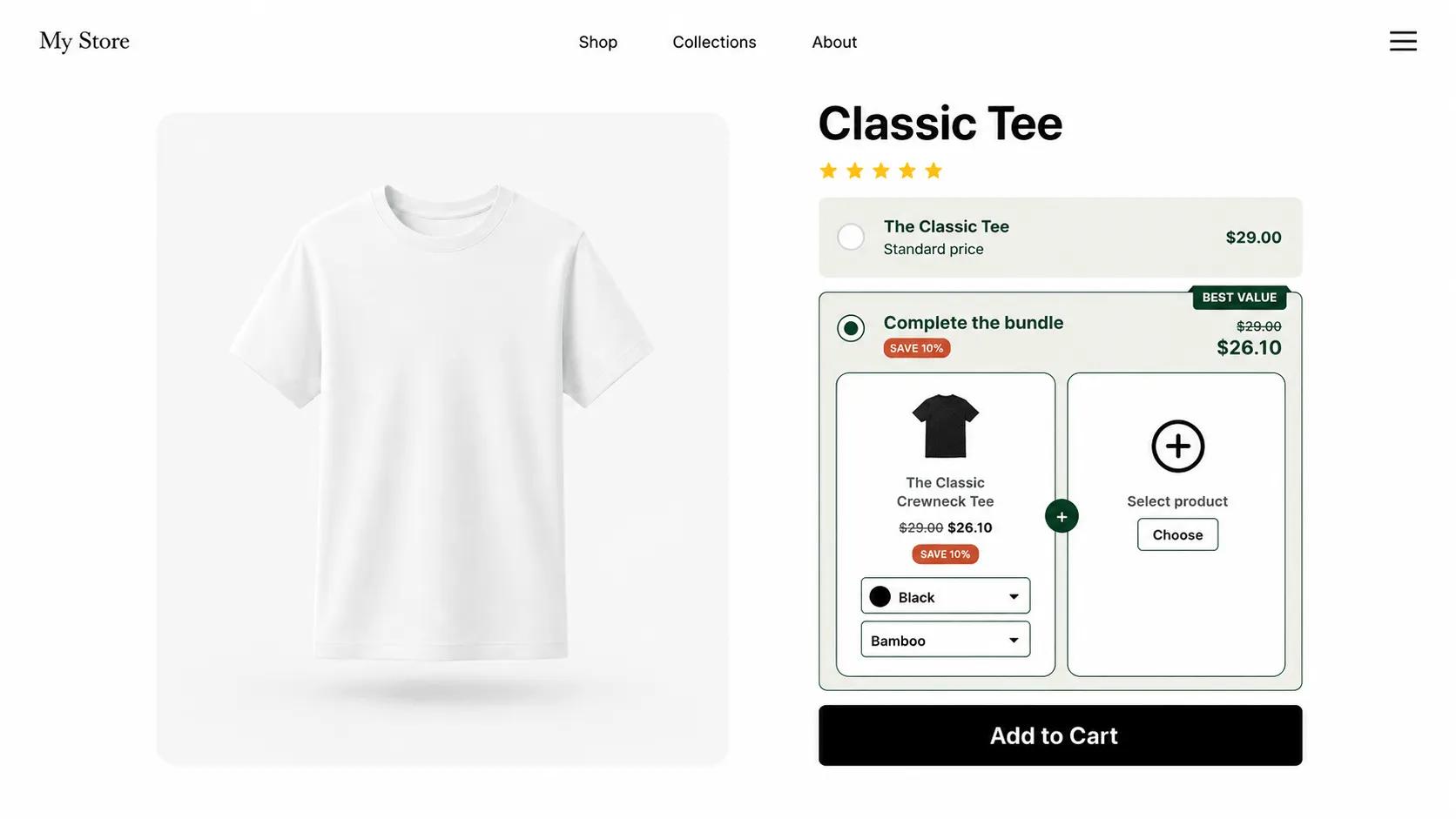
What is a mix and match bundle?
A mix and match bundle, sometimes called a dynamic bundle or build-your-own bundle, lets the customer decide what goes in the box. You build a bundle with several slots and, for each slot, let the shopper choose from a curated list of eligible products. Shoppers assemble their own combination and get your bundle price on the set. The sense of control is what makes this format convert: people commit to larger carts when they chose every item themselves.
V Bundles handles the selection interface, the discount logic, and the checkout math. You decide how many slots the bundle has and which products are eligible for each one, and the widget guides the shopper through building their bundle on the product page.
What you can do with Mix & Match Bundles
Customer-built combinations
Shoppers pick their own mix from the products you allow, which works especially well for apparel, food, and beauty catalogs.
Flexible bundle discounts
Discount each item in the build, or set a custom price for the set, so the mix-and-match bundle beats buying the products separately.
Curated product options
You stay in control of margins by deciding exactly which products and variants are eligible for each slot in the bundle.
Guided bundle builder
The widget walks shoppers through each slot, showing the products they can choose and the price they are building toward.
How to set up Mix & Match Bundles in V Bundles
- 1
Install V Bundles
Install V Bundles from the Shopify App Store and open it from your Shopify admin.
- 2
Create a build-your-own bundle
Click Create Bundle and choose the multi-product bundle template, which lets you combine several products into one offer.
- 3
Set the slots and eligible products
For each slot in the bundle, choose whether you pick the product or let the customer choose it from a curated list of eligible products.
- 4
Set the bundle discount
Discount each item in the build or set a custom total price, so the assembled bundle costs less than buying the products separately.
- 5
Style and publish
Customize the widget theme, titles, and badges to match your storefront, then preview and publish.
Step-by-step guides
Related features
All featuresFixed Bundles
Create fixed product bundles on Shopify: curated sets like kits and routines sold at one bundle price.
Learn moreQuantity Breaks
Add quantity breaks to any Shopify product: tiered discounts like "buy 2, get 15% off" on the product page.
Learn moreBundle Themes
120+ bundle widget themes with element-level styling to match any Shopify theme, no coding needed.
Learn more