Sticky Add to Cart Button for Shopify
A sticky button pinned to the bottom of your product page opens your bundle deals in a popup, so the offer stays one tap away no matter how far shoppers scroll.
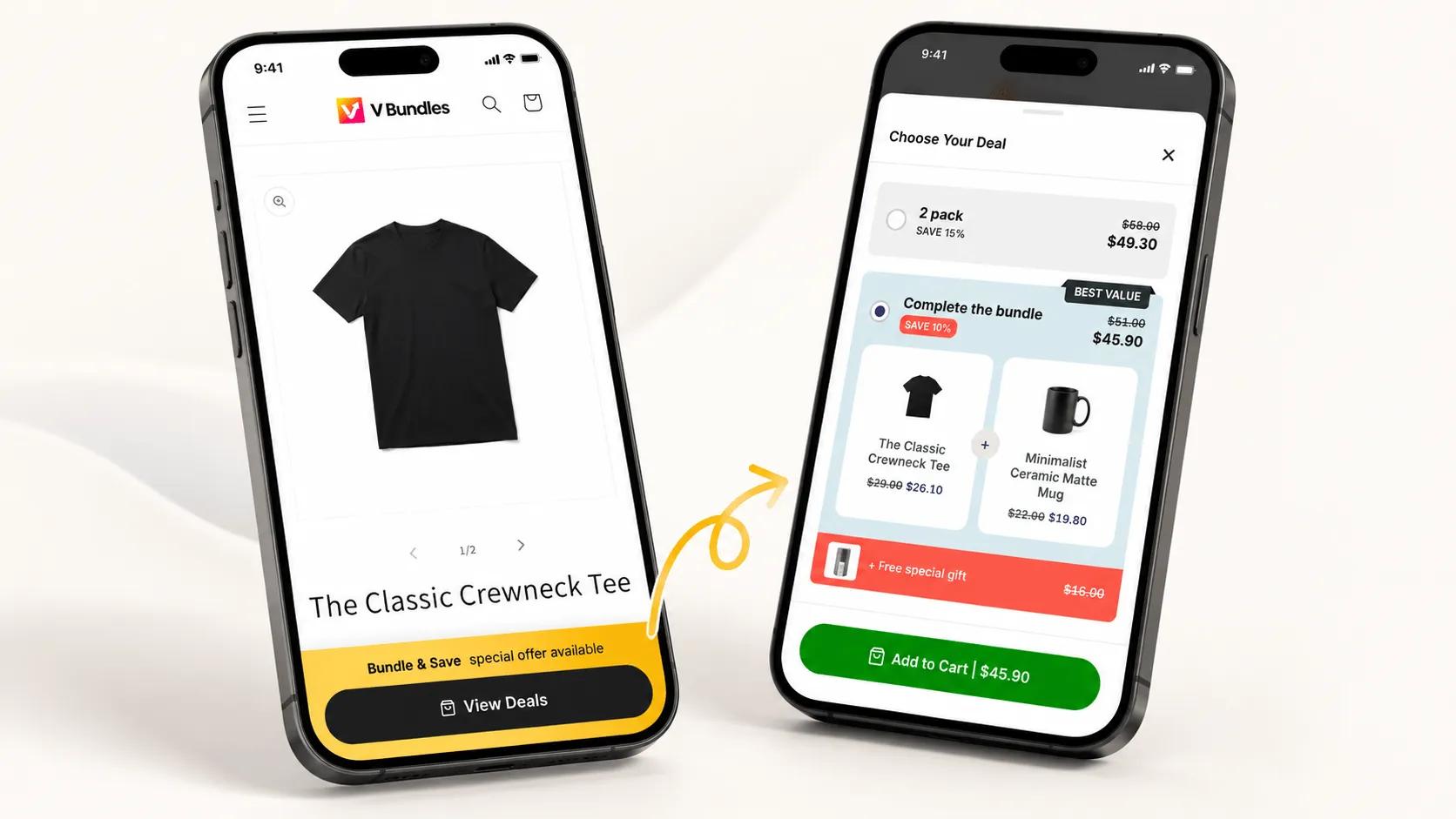
What is a sticky add-to-cart button?
A sticky add-to-cart button is a button pinned to the bottom of the product page that stays visible while the shopper scrolls through descriptions, reviews, and images. On long product pages, and especially on mobile, the buy area disappears within one swipe; the sticky button keeps the offer within reach the whole time.
In V Bundles, the sticky button (for example "View deals") opens your bundle widget in a popup, where the shopper picks the deal they want, like a quantity tier or a bundle, and adds it to the cart on the spot. The full offer travels with the customer instead of staying stranded at the top of the page.
What you can do with Sticky Add to Cart
Always within reach
The button stays pinned to the bottom of the page, so shoppers never have to scroll back up to buy.
Deals open in a popup
Tapping the button opens your bundle widget in a modal, where the shopper picks an offer and adds it straight to the cart.
Built for mobile
Most Shopify traffic is mobile, where product pages are longest and the buy area vanishes fastest.
Styled to match
Button text, colors, and layout are customizable so it looks native to your theme.
How to set up Sticky Add to Cart in V Bundles
Learn how to create a bundle widget in V Bundles, enable and customize the Sticky Button, choose which products display it, and preview it on desktop and mobile before publishing.
- 1
Install and open V Bundles
Install V Bundles from the Shopify App Store, activate the app, and open it from your Shopify admin.
- 2
Create or open a bundle widget
Start a new widget or open an existing one that contains the bundle offers you want shoppers to see.
- 3
Set up your bundle deals
Add the products, quantity tiers, discounts, and offer text that will appear when the sticky button opens the bundle popup.
- 4
Enable the sticky button
Turn on the Sticky Button element. This premium feature is included with paid plans starting at $9.99/month with a 7-day free trial.
- 5
Customize the button
Adjust the button text, colors, and layout so it matches your Shopify theme and clearly invites shoppers to view your deals.
- 6
Choose where it appears
Select which products should display the sticky button so it only appears on product pages with relevant bundle offers.
- 7
Preview on desktop and mobile
Check the widget on both screen sizes, scroll beyond the main offer, and confirm the sticky button stays visible without covering important page elements.
- 8
Publish and test
Publish the widget, open a live product page, and verify that the button opens the correct bundle deals and adds the selected offer to the cart.
Step-by-step guides
Related features
All featuresCountdown Timer
Show a countdown to a date you choose, with custom labels, styling, and a choice of end actions.
Learn moreBundle Themes
120+ bundle widget themes with element-level styling to match any Shopify theme, no coding needed.
Learn moreQuantity Breaks
Add quantity breaks to any Shopify product: tiered discounts like "buy 2, get 15% off" on the product page.
Learn more