Subscription Bundles for Shopify
Add a subscribe-and-save option to your bundle offers and turn one-time buyers into recurring revenue. Works alongside popular Shopify subscription apps.
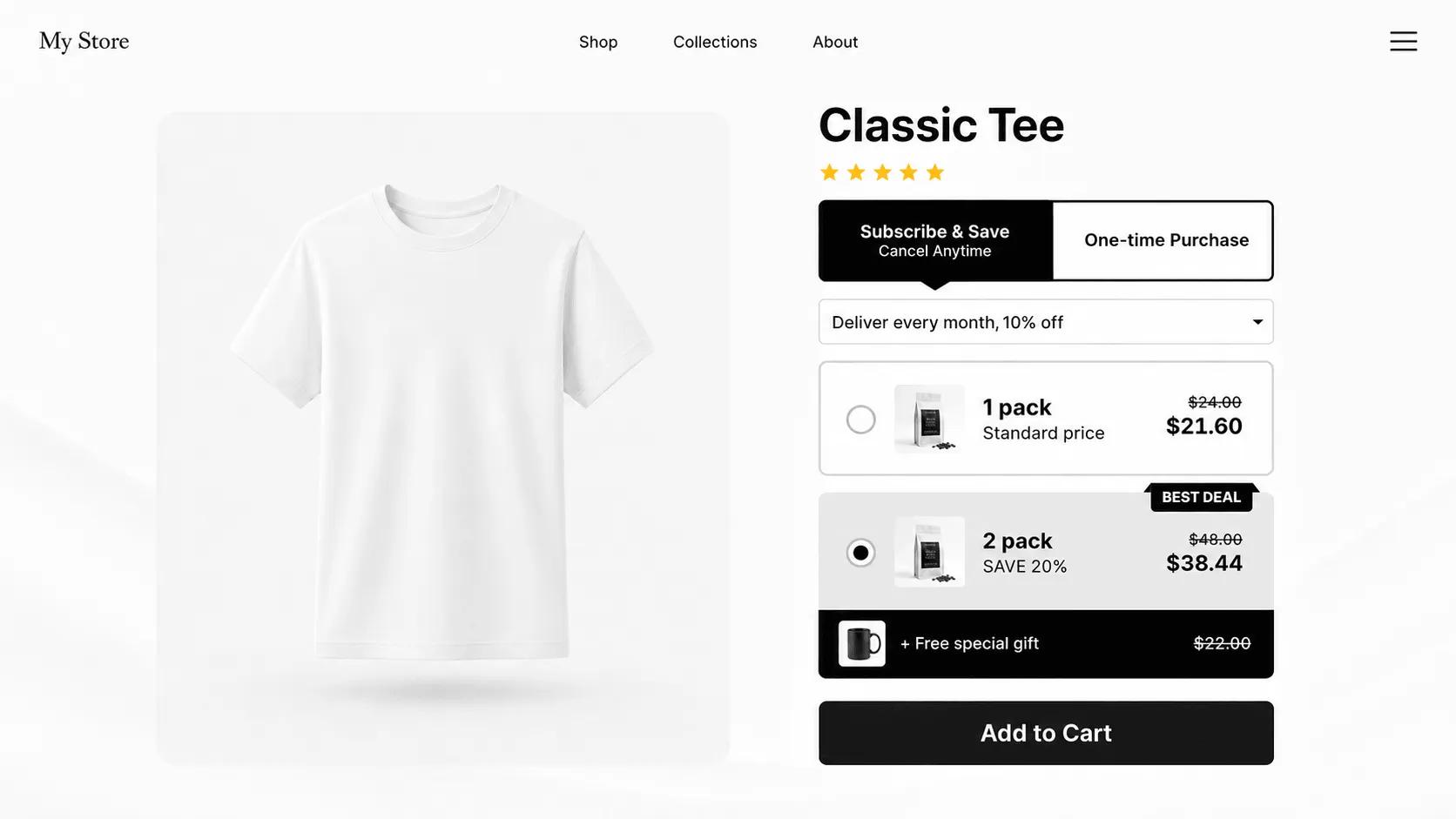
What is a subscription bundle?
A subscription bundle is a product bundle that customers receive on a recurring schedule at a subscribe-and-save price. It combines two of the strongest levers in e-commerce: a bundle discount that raises the initial order value, and a subscription that keeps the customer coming back. Shoppers pick the bundle, choose a delivery frequency, and save more for committing.
V Bundles adds the subscription option directly inside the bundle widget and works with any subscription app that uses Shopify's native selling plans, such as Recharge, Bold Subscriptions, and Appstle, so recurring billing keeps running through the tools you already use.
What you can do with Subscription Bundles
Subscribe-and-save inside the widget
The one-time price and the subscription price appear side by side, making the recurring option an easy upgrade.
Works with your subscription app
Works with subscription apps built on Shopify's native selling plans, such as Recharge, Bold, and Appstle, instead of replacing them.
Predictable recurring revenue
Consumable and replenishable products convert one-off buyers into a subscriber base you can forecast.
Configurable frequencies and discounts
Offer weekly, monthly, or custom delivery intervals with a deeper discount for subscribers.
How to set up Subscription Bundles in V Bundles
- 1
Install V Bundles and your subscription app
Install V Bundles from the Shopify App Store, and make sure your subscription provider (for example Recharge, Bold, or Appstle) is set up with selling plans.
- 2
Create or open a bundle
Build the bundle offer you want to sell on subscription, or open an existing one.
- 3
Enable the subscription option
Turn on the subscription widget for the offer and connect the selling plans from your subscription provider.
- 4
Set subscriber pricing
Give subscribers a stronger saving than one-time buyers so the recurring option is clearly the better deal.
- 5
Preview and publish
Check how the one-time and subscription prices display on the product page, then publish.
Step-by-step guides
Related features
All featuresFixed Bundles
Create fixed product bundles on Shopify: curated sets like kits and routines sold at one bundle price.
Learn moreQuantity Breaks
Add quantity breaks to any Shopify product: tiered discounts like "buy 2, get 15% off" on the product page.
Learn moreProgressive Gifts
Add tiered free gifts and free shipping to your Shopify bundle offers, with rewards based on the selected offer.
Learn more